How to see your saved links on both iPhone and iPad
Published · 5 min read
You saved an article on your iPhone and it is not on your iPad. Whether it shows up depends on where you saved it: Safari carries bookmarks and Reading List through iCloud, other browsers use their own account, and many apps keep everything on one device.
This guide explains each case, gives a short checklist for when something is missing, and shows how Linkeeper handles it. Menu names are from recent iOS and iPadOS versions and can differ slightly on yours.
Which saved links follow you from iPhone to iPad?
- Safari bookmarks, Favorites, Reading List and tab groups: yes, through iCloud, when both devices use the same Apple Account and Safari is turned on in iCloud.
- Chrome, Edge and Firefox bookmarks: yes, but through that browser's own account, not iCloud.
- Links in Apple Notes: only for notes stored in iCloud. Notes stored “On My iPhone” never leave the phone.
- Links inside other apps (a social app's saved posts, a read-later app): it depends on the app. Some sync through their own account, some keep everything on the device.
If the item is on neither device's sync list, nothing is broken: it simply was never set up to travel.
How do I turn on Safari sync between iPhone and iPad?
- 1On both devices, open Settings and tap your name at the top. Check that it is the same Apple Account.
- 2Tap iCloud. On newer iOS versions you may need to tap Show All or Apps Using iCloud first.
- 3Find Safari in the list and turn on Sync this iPhone (or Sync this iPad).
- 4Do the same on the other device, and make sure both have an internet connection.
Syncing is not instant. Wait a few minutes, then reopen Safari on the other device. If Reading List items still do not appear, Reading List not syncing between iPhone and Mac lists more fixes, and the steps are the same on iPad.
What if a link is still missing after that?
- 1Check that the link was saved to the place you are looking at. A Safari bookmark does not appear in the Reading List, and the other way around.
- 2Check that both devices have the same Apple Account, not a second account that was set up long ago.
- 3Check that you are not in a Private tab group or Private Browsing, which keeps nothing.
- 4Check that Airplane mode and Low Data Mode are off on both devices while you wait.
- 5Restart the app on the device that is missing the item, then open it once on Wi-Fi.
How does Linkeeper sync links between iPhone and iPad?
Linkeeper is an iPhone and iPad app that saves links from any app in one tap and keeps them in one organized, searchable library to read later. It stores your library on the device first, so it works with no account and no connection. Sync is optional and separate from iCloud:
- Open Settings in Linkeeper and sign in with Apple or Google, on both devices, with the same account.
- Your links (with notes and tags), tags and collections are then kept the same on every device. Linkeeper syncs when you open the app, and the Sync now button in Settings runs it on demand.
- Highlights currently stay on the device where you made them.
- Links in the hidden vault sync too, and stay hidden on the other device.
- Sync is part of Linkeeper Unlimited, a one-time purchase, for new users. People who were already using sync keep it free.
On iPad the same library opens as a list next to the article you are reading, which is handy for a long backlog.
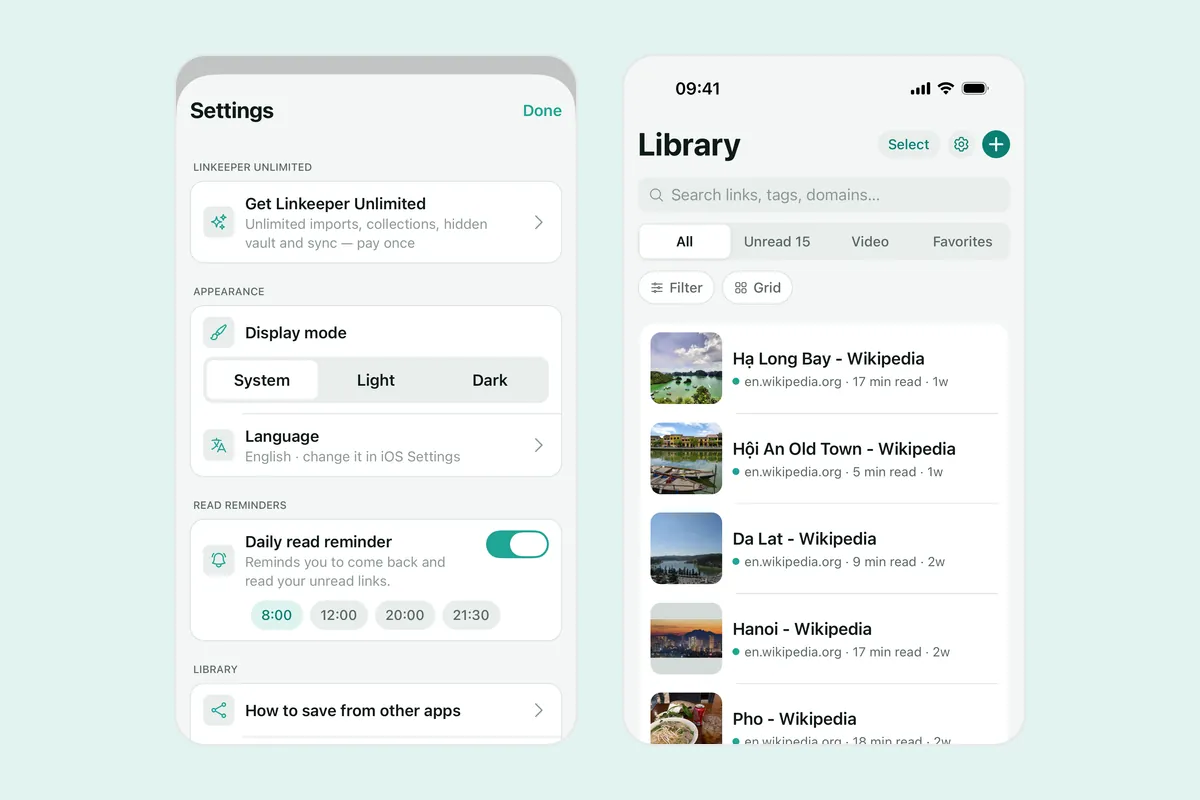
Without an account you can still move the library by hand: export it to a JSON file in Settings, save the file to iCloud Drive, and restore it on the other device. That is a one-time copy, not live sync; see how to back up your links before switching iPhones.
Is there a quicker way for a single link?
For one link you need on the other device right now, you do not need sync at all. Send it to yourself in Messages or Mail, or use AirDrop; how to send a link to yourself covers the options. It works, but the link ends up buried in a chat, so sync is better for a library you keep adding to.
Frequently asked questions
- Why are my Safari bookmarks and Reading List not the same on my iPhone and iPad?
- Safari must be turned on in iCloud on both devices, with the same Apple Account. Open Settings, tap your name, tap iCloud and turn Safari on, then wait a few minutes and reopen Safari.
- Do Apple Notes links sync from iPhone to iPad?
- Only if the note is stored in iCloud. Notes saved “On My iPhone” stay on the phone.
- Do Chrome bookmarks sync between iPhone and iPad?
- Yes, when you are signed in to the same browser account on both devices and bookmarks are included in its sync settings. This is separate from iCloud.
- Does Linkeeper work on iPad?
- Yes. Linkeeper runs on iPhone and iPad. To see the same library on both, sign in with the same Apple or Google account on each; sync is part of Linkeeper Unlimited for new users, and people who already used sync keep it.