How to set a reminder to read a link later on iPhone
Published · 5 min read
To get reminded about a link on iPhone, open the page in Safari, tap Share, choose Reminders, then set a date and time on the new reminder. At that time your iPhone sends a notification, and the reminder holds the link.
Safari’s own Reading List does not send reminders, so a saved page just sits there. This guide covers the built-in ways to attach a time to a link, their limits, and what to use when you want a gentle nudge instead of a deadline. Menu names can differ slightly between iOS versions.
How do I set a reminder for a link with the Reminders app?
- 1Open the page in Safari and tap the Share button.
- 2Choose Reminders in the row of apps. If you do not see it, scroll the row or tap More.
- 3Check the title and list in the sheet that opens, then tap Save. The page title and link go into a new reminder.
- 4Open the Reminders app, tap the new reminder, then tap the Details (i) button to set a date, time or location.
The reminder keeps a tappable link, so the notification takes you straight back to the page. Nothing is set automatically: until you add a date or time, it is a plain to-do with no notification.
Can I ask Siri to remind me about a page?
Often, yes. With the page open in Safari, say something like “Remind me about this tomorrow at 7 pm.” Siri can use what is on screen, and the reminder it creates points to the page. This depends on your iOS version, language and Siri settings, so test it once before relying on it. If Siri creates a reminder without the link, add the link in Details as above.
Why does Safari’s Reading List not remind me?
Reading List is a list, not a scheduler. It has no due dates and sends no notifications, and it syncs through iCloud rather than nudging you. See Safari Bookmarks vs Favorites vs Reading List for what each one is for.
When is a one-off reminder the wrong tool?
A reminder works for one link you need at a specific time: a recipe for Saturday, a form due Friday. It breaks down when you save many links, because each one needs its own date and the Reminders app fills up with to-dos that do not say what the link is about.
- You saved ten links this week and set no dates. Nothing prompts you to read any of them.
- You set a date, dismissed the notification, and the reminder disappears into a long list.
- A reminder cannot be searched by what the page says, only by its title.
For links you want to read someday, a regular habit works better than a date per link. How to actually read the articles you save covers building that habit, and how to send a link to yourself compares other ways to park a link.
How does Linkeeper remind me to read saved links?
Linkeeper is an iPhone and iPad app that saves links from any app in one tap and keeps them in one organized, searchable library. It does not set a reminder per link. It nudges you about your unread queue instead:
- A daily read reminder: in Settings, under Read reminders, switch on Daily read reminder and pick a time. The presets are 8:00, 12:00, 20:00 and 21:30. The notification says how many unread links are waiting.
- An optional weekly summary, off by default: a Sunday evening notification that tells you how many links you finished and how many are still waiting.
- Rediscover (shown as “Rediscover today”): on the Read Later tab, one unread link that has been saved for at least three days, picked for today, with a Read now button and an Another button for a different one.
Notifications need your permission. If you declined them, turn on Notifications for Linkeeper in the iPhone’s Settings app. Reminders are local notifications from the app, with no account needed.
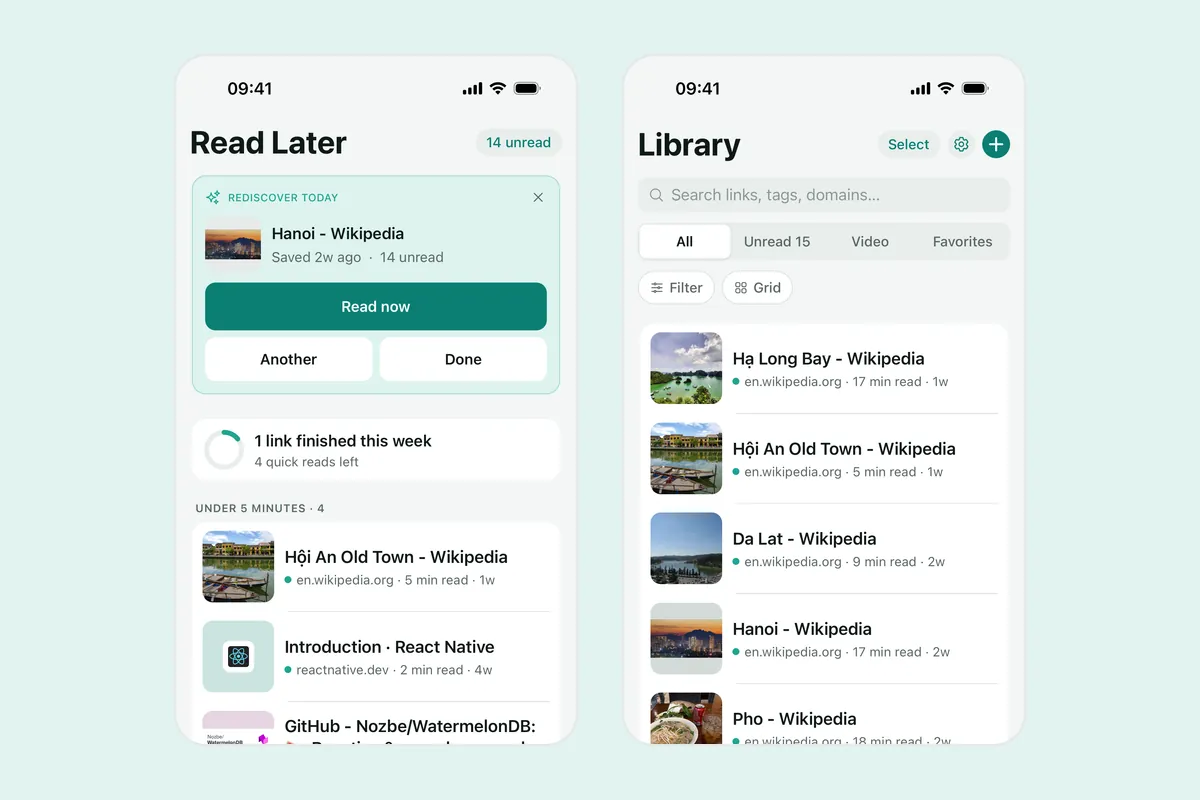
To save a link, tap Share in Safari and choose Linkeeper; it is saved without opening the app. If it is not in the row, add it to the share sheet.
Honest limits: you cannot choose a date or time for one specific link, and the daily reminder fires at one of the four preset times. If you need a link at an exact moment, use the Reminders app above.
Frequently asked questions
- How do I set a reminder to read a link on iPhone?
- Open the page in Safari, tap Share, choose Reminders and save, then open the new reminder in the Reminders app and set a date and time under Details.
- Does Safari Reading List send reminders?
- No. Reading List has no due dates and sends no notifications. It only keeps a list of pages and syncs it through iCloud.
- Can Siri remind me about a web page?
- Often. With the page open in Safari, ask Siri to remind you about this at a time. Support depends on your iOS version, language and settings, so check that the reminder contains the link.
- Can Linkeeper remind me about one specific link?
- No. It sends a daily reminder with the number of unread links (at 8:00, 12:00, 20:00 or 21:30), an optional weekly summary, and a daily Rediscover pick, but you cannot set a date for a single link.
- Does Linkeeper need an account for reminders?
- No. Reminders are local notifications from the app. Signing in is optional and only used to sync your library between devices.