
How to find your bookmarks on X (Twitter) and keep them from getting lost
Published · 5 min read
To see the posts you bookmarked on X (formerly Twitter), tap your profile picture at the top left of the iPhone app and choose Bookmarks. On the website the same Bookmarks entry is in the left-hand menu. Bookmarks are private: only you can see them.
That list is easy to fill and hard to search. This guide covers how to find it, why a bookmarked post sometimes stops opening, and how to keep a copy of the link somewhere you control, including a Linkeeper setup that tags X links automatically.
How do I bookmark a post on X, and where do I find it later?
- 1Open the post and tap the Bookmark icon under it. You can also tap the Share icon and choose “Add post to Bookmarks”.
- 2To see your bookmarks on iPhone, tap your profile picture at the top left, then choose Bookmarks.
- 3To remove one, open Bookmarks and tap the Bookmark icon on that post again.
On a computer, open x.com, and Bookmarks is in the left-hand menu (under “More” if the menu is collapsed). Your bookmarks belong to your account, so the same list appears on every device where you sign in.
Can other people see my X bookmarks?
No. X states that Bookmarks are private and only visible to you, and the account that posted is not told that you bookmarked it. That is different from a like, which is public.
Why can't I find a post I bookmarked?
A few common reasons, roughly in the order worth checking:
- You are signed in to a different account. Bookmarks belong to one account, so switch accounts and look again.
- The post was deleted, the account was suspended or deactivated, or the author made their account protected. In those cases the bookmark may no longer show the post or may not open it, and the original text is gone for you too.
- You liked it instead. Likes and bookmarks are separate lists. Likes are on the profile page, under the Likes tab.
- The list is long. Bookmarks appear newest first, and scrolling back months is slow. Some versions of the app have a search box at the top of Bookmarks that looks for words in the saved posts; if yours has one, try a word from the post or the author's handle.
The uncomfortable part is the second one: a bookmark is a pointer to a post, not a copy. If the post disappears, so does what you wanted from it. For anything that matters (a how-to thread, a source for work), write down the key point along with the link, as described below.
How do I keep my own list of X posts?
Three options, from the simplest:
- Stay in X. Fine for “I might look at this tonight”, but X has no folders you can rely on across all accounts, so long-term lists get messy. Some accounts may have bookmark folders; check your own Bookmarks screen.
- Copy the link to Notes or a chat with yourself. Tap Share under the post, choose Copy link, paste it with a few words about why. Searchable, but links show no preview and the list grows into one long note.
- Send the link to a link app. See below. Your list then also holds links from other apps, which is the point if you read on X, YouTube and the web.
Whichever you pick, add a few words of context at the moment you save. “Thread on Swift concurrency” is findable in a year; a bare address is not.
How do I save an X post to Linkeeper?
Linkeeper stores the link, not the post itself, but it makes the list searchable and sorted by source. It works from the iOS share sheet, so you never leave X.
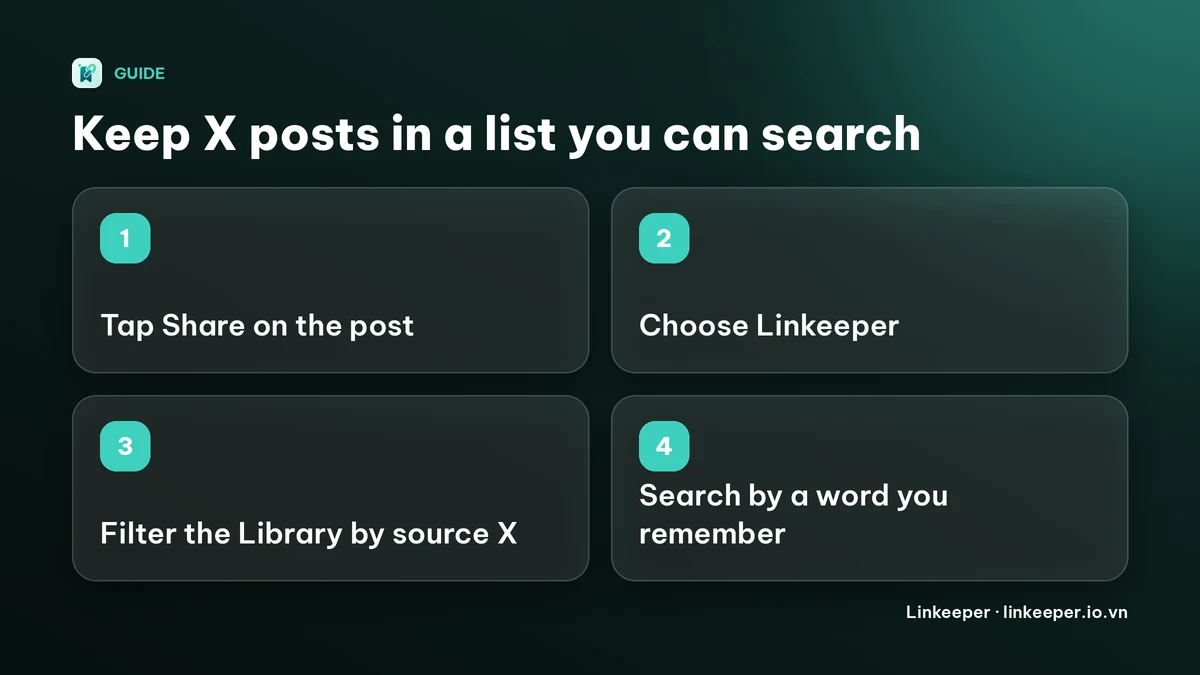
- 1In the X app, open the post and tap the Share icon, then choose Share via… to reach the iOS share sheet. If a Copy link option is all you see, use it and then open Linkeeper and add the link from the clipboard instead.
- 2Choose Linkeeper in the share sheet. The link is saved without opening the app; if Linkeeper is not in the row of apps, scroll to the end and tap More to add it. How to add an app to the iPhone share sheet shows how.
- 3Later, open the Library tab. Links from x.com and twitter.com are recognized as coming from X and get an “X” tag automatically.
- 4To see only your X links, tap Filter at the top of the Library, find the Source section and choose X. You can combine it with a tag of your own.
- 5To find one by a word you remember, use the search bar. It searches titles, your notes and, for pages that were read, the saved text, and works offline.
One honest limitation: Linkeeper reads a link's title and thumbnail from the page itself, and X pages do not always give that to an app. For some X posts the card may show only the web address and a source label instead of the post text. When that happens, open the link, tap Retry if offered, or add your own note on the link's detail screen (“Add a note…”) so the card is still searchable by what you remember.
Should I keep using X bookmarks too?
Yes, if you like them. Bookmarking in X is one tap and costs nothing, and there is no reason to stop. A link app is for the posts you want to be able to find with everything else you have saved, from one search box. For how other apps handle the same problem, see how to save Threads posts, and for the general case, how to find a saved link on iPhone.
Frequently asked questions
- Where are my bookmarks on X?
- On the iPhone app, tap your profile picture at the top left and choose Bookmarks. On x.com, Bookmarks is in the left-hand menu, under More if the menu is collapsed. Menus change between versions, so check X's Help Center if yours looks different.
- Can anyone see what I bookmarked on X?
- No. X says bookmarks are private and only visible to you. This is different from likes, which are public.
- Why did a bookmarked post disappear?
- Most often the post was deleted, the account was suspended or made protected, or you are signed in to a different account. A bookmark is a pointer to the post, not a copy of it.
- Can I save an X post to a link app on iPhone?
- Yes. Use the Share icon on the post and open the iOS share sheet, or copy the link. In Linkeeper, links from x.com and twitter.com get an “X” tag automatically and can be filtered by source.
- Does Linkeeper save the text of the X post?
- No guarantee. It saves the link and tries to fetch a title and thumbnail, which X does not always provide to apps. Add a short note of your own so you can still find the post by what you remember.