
How to share a list of links or bookmarks from your iPhone
Published · 6 min read
On an iPhone you can send one link in two taps, but there is no button in Safari that shares a whole bookmarks folder. To send a list, you either share a Safari Tab Group, paste the links into a message or note, or use an app that turns a group of links into one shareable page. Linkeeper does the last one: share a collection and the other person gets a web link that opens a read-only list.
This guide compares the options, then walks through sharing a Linkeeper collection, including what the other person sees, what they cannot do, and how to switch the link off.
Can Safari share a folder of bookmarks?
Not as far as we know: in Safari's Bookmarks screen you can share a single page from its menu or the Share button, but folders have no share option. Apple has also never offered a “shared bookmarks folder” that two people both edit. What Safari does offer is a different feature, below.
Menu names vary between iOS versions, so if something looks different on your phone, check Apple's Safari support pages for your version.
What are my options for sharing a list of links?
| Method | Good for | Watch out for |
|---|---|---|
| Safari Tab Group, shared | A small group planning something together, all on Apple devices | Needs iOS 16 or later; people see open tabs, not a tidy list, and everyone can change the group |
| Paste links into Messages, Mail or a note | Five or ten links, once | Links arrive as bare addresses with no titles; the list is a copy and does not update |
| Shared note (Apple Notes) | A list several people add to | Everyone needs an Apple Account; the note holds text links, not previews |
| A collection page from a link app | Sending a finished list to anyone, on any phone, with titles and images | Read-only; the other person cannot add to it |
None of these is best for everything. For a list that people add to together, a shared note or Tab Group fits. For “here are the 12 links I found, open them on whatever phone you have”, a page that anyone can open is easier.
How do I share a collection in Linkeeper?
In Linkeeper a collection is a group of links, like a folder, and a link can sit in several collections. Sharing one creates a public web page for it.
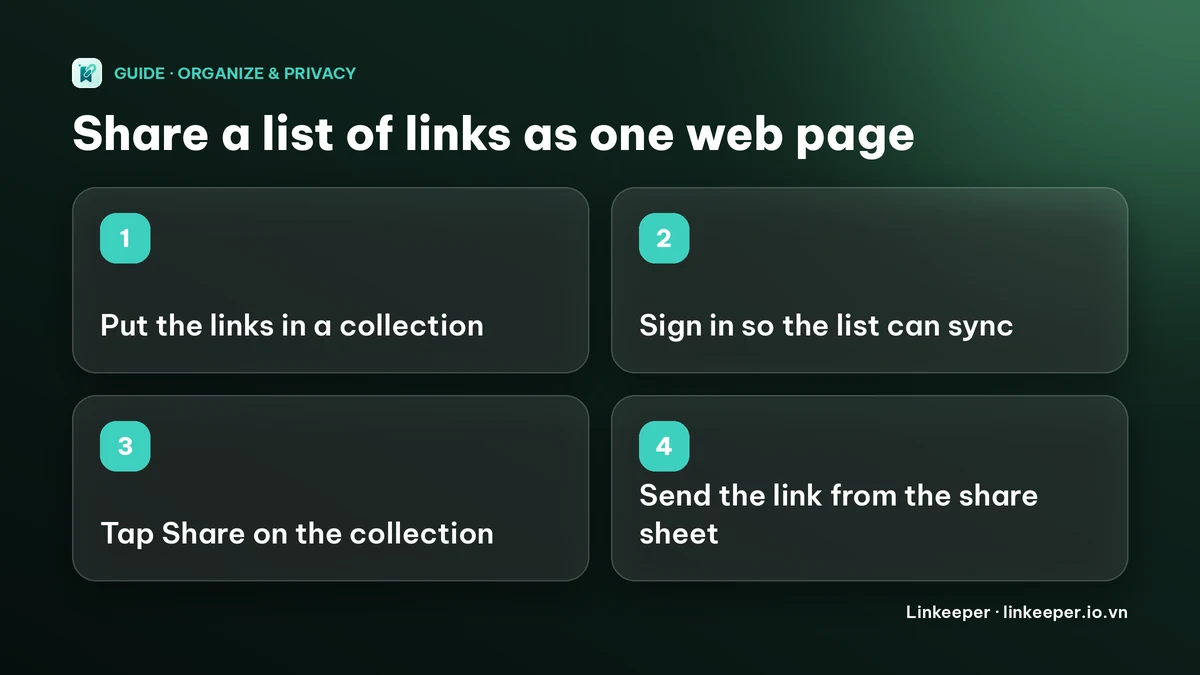
- 1Create the collection in the Collections tab, then open a saved link and tap “Add to collection” to put it in. Repeat for each link.
- 2Make sure you are signed in (Settings → sign in with Apple or Google). Sharing needs sign-in because the list has to exist on a server for the other person to open it.
- 3Open the collection and tap Share at the top right. Linkeeper syncs the collection first, then opens the iOS share sheet with a ready message: “Check out the “…” collection on Linkeeper:” followed by the link.
- 4Choose how to send it: Messages, Mail, WhatsApp, AirDrop or any other app in the share sheet.
What does the other person see?
They tap the link and a simple web page opens in their browser. No app and no account are needed, and it works on Android and on a computer too.
- The collection's name and the number of links.
- Each link as a card with its title, its website and a thumbnail when one was fetched. Tapping a card opens the original page in a new tab.
- Nothing else: your notes, tags and highlights are not on the page, and neither is any link you hid in the private vault, even if it is in the collection.
The page is read-only. The other person can open links but cannot add, remove or reorder them, and they cannot save the whole list into their own Linkeeper with one tap. They can copy the addresses they want.
One honest limitation: in the current version, the small labels on that page (such as “view only” and “Shared from Linkeeper”) are in Vietnamese. The names and titles you see are your own.
Who can open the link, and how do I turn it off?
Anyone who has the link can open the page. The address ends in a long random code, so it is not guessable, but it is not password-protected: if the person you sent it to forwards it, the next person can open it too. The page asks search engines not to index it.
To stop sharing, open the collection and tap Share again. The sheet says “Sharing publicly” and offers Send link or Stop sharing. After you stop, the page shows a “collection doesn't exist” message and the link no longer works. Tapping Share later creates a working link again, using the same code.
Because the page reads from the server, links you add to the collection show up for people who open it again after your iPhone has synced. They do not need a new link.
For links you do not want on any shared page, see how to keep private links hidden on iPhone.
When is a shared list worth it?
- A trip: restaurants, places and videos you saved while planning. See how to plan a trip from saved TikTok and Instagram places.
- A class or study group: readings and references in one place. See how students can organize study links.
- A reading list for a friend, a recommendation list for a team, or a set of references for a project.
Before you share, check the list: titles that look wrong can be refreshed, and one link per topic is easier to follow than a wall of everything. Tags or folders: how to organize bookmarks helps you decide how to group them.
Frequently asked questions
- Can I share a Safari bookmarks folder from my iPhone?
- Safari has no share option for a bookmarks folder. You can share single pages, share a Tab Group (iOS 16 or later), paste several links into a message or note, or use an app that makes a shareable page from a list.
- Does the person I share a Linkeeper collection with need the app?
- No. The link opens a read-only web page in any browser, on any phone or computer. They do not need Linkeeper or an account.
- Can the other person add links to my shared collection?
- No. The shared page is view-only. For a list several people edit, use a shared note or a shared Safari Tab Group instead.
- Are my private or hidden links shared too?
- No. Links in Linkeeper's private vault are left out of the shared page, even if they are in the collection. Your notes, tags and highlights are not shown either.
- How do I stop sharing a collection?
- Open the collection, tap Share, then choose Stop sharing. The link stops working straight away.